


- Online-Coloring.com
- Interactive & Printable Coloring Pages
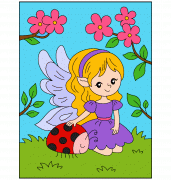
- Coloring Page #1805 - Elodie, the Ladybug Fairy
In a little garden hidden behind fragrant flowers lived a young fairy named Elodie. Unlike other fairies who spent their days casting spells or dancing among the clouds, Elodie preferred taking care of the animals that lived in the garden. Her best friend was a cheerful ladybug named Ruby, much larger than ordinary ladybugs. Legend says that this giant ladybug was born from a magical drop of morning dew that fell during a night filled with shooting stars.
One morning, Elodie discovered that all the colors of the garden had mysteriously vanished. The flowers looked sad, the leaves had lost their shine, and even the fairy's delicate wings seemed less radiant than usual. Ruby revealed a secret: only colors chosen by children could restore the magic of the enchanted garden. Determined to help, Elodie set out to find a young artist who could bring life and color back to their wonderful world.
In this Fairy Coloring Page, you can help Elodie and Ruby recover the beauty of their magical garden. The flowers can bloom in shades of pink, purple, yellow, or even rainbow colors. The fairy's wings can sparkle in lavender blue, turquoise, or pearly pink. And of course, Ruby the ladybug will look amazing with a bright red shell covered in bold black spots.
This Online Coloring Page can be completed directly on your screen using the interactive coloring tools, or printed out if you prefer coloring with crayons, markers, or colored pencils. This Free Coloring Page encourages children to create their own fairy tale adventure while developing creativity and imagination.
If you enjoy magical characters and enchanted worlds, you might also like the Fairy Riding a Snail Coloring Page, where the little fairy Capucine travels through a magical garden on the back of her faithful snail companion. Are you ready to help Elodie and Ruby bring the colors back to their enchanted garden?






















































































If you like to color pictures while you're online, just Pick a color from the palette and then, click on the picture area you wish to color!
To undo your last action, click on the eraser icon. To clear the coloring page to start over, click and hold down on the eraser icon.
To print out a black and white coloring sheet, use the eraser to remove all the colors in the picture, and click the printer icon! Then, color it with your crayons or your paints!